|
||||
|




     |

|
|
|
VPN (Virtual Private Networks)The world has changed a lot in the last couple of decades. Instead of simply dealing with local or regional concerns, many businesses now have to think about global markets and logistics. Many companies have facilities spread out across the country or around the world, and there is one thing that all of them need: A way to maintain fast, secure and reliable communications wherever their offices are. Until fairly recently, this has meant the use of leased lines to maintain a wide area network (WAN). Leased lines, ranging from ISDN (integrated services digital network, 128 Kbps) to OC3 (Optical Carrier-3, 155 Mbps) fiber, provided a company with a way to expand its private network beyond its immediate geographic area. A WAN had obvious advantages over a public network like the Internet when it came to reliability, performance and security. But maintaining a WAN, particularly when using leased lines, can become quite expensive and often rises in cost as the distance between the offices increases. As the popularity of the Internet grew, businesses turned to it as a means of extending their own networks. First came intranets, which are password-protected sites designed for use only by company employees. Now, many companies are creating their own VPN (virtual private network) to accommodate the needs of remote employees and distant offices.
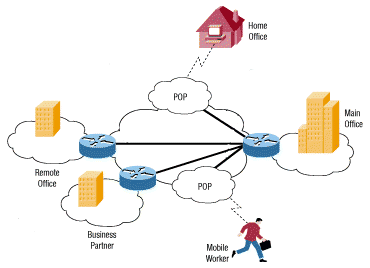
A typical VPN might have
a main LAN at the corporate headquarters of a company, other LANs at remote offices or
facilities and individual users connecting from out in the field. Basically, a VPN is a private network that uses a public network (usually the Internet) to connect remote sites or users together. Instead of using a dedicated, real-world connection such as leased line, a VPN uses "virtual" connections routed through the Internet from the company's private network to the remote site or employee. What Makes a VPN? A well-designed VPN can greatly benefit a company. For example, it can:
What features are needed in a well-designed VPN? It should incorporate:
There are mainly two types of VPN. Remote-Access VPN There are two common types of VPN. Remote-access, also called a virtual private dial-up network (VPDN), is a user-to-LAN connection used by a company that has employees who need to connect to the private network from various remote locations. Typically, a corporation that wishes to set up a large remote-access VPN will outsource to an enterprise service provider (ESP). The ESP sets up a network access server (NAS) and provides the remote users with desktop client software for their computers. The telecommuters can then dial a toll-free number to reach the NAS and use their VPN client software to access the corporate network. A good example of a company that needs a remote-access VPN would be a large firm with hundreds of sales people in the field. Remote-access VPNs permit secure, encrypted connections between a company's private network and remote users through a third-party service provider.
Site-to-Site VPN Through the use of dedicated equipment and large-scale encryption, a company can connect multiple fixed sites over a public network such as the Internet. Site-to-site VPNs can be one of two types:
VPN Security: Firewalls A well-designed VPN uses several methods for keeping your connection and data secure:
In the following sections, we'll discuss each of these security methods. We'll start with the firewall. A firewall provides a strong barrier between your private network and the Internet. You can set firewalls to restrict the number of open ports, what type of packets are passed through and which protocols are allowed through. Some VPN products, such as Cisco's 1700 routers, can be upgraded to include firewall capabilities by running the appropriate Cisco IOS on them. You should already have a good firewall in place before you implement a VPN, but a firewall can also be used to terminate the VPN sessions.
VPN Security: Encryption Encryption is the process of taking all the data that one computer is sending to another and encoding it into a form that only the other computer will be able to decode. Most computer encryption systems belong in one of two categories:
VPN Technologies Depending on the type of VPN (remote-access or site-to-site), you will need to put in place certain components to build your VPN. These might include:
Because there is no widely accepted standard for implementing a VPN, many companies have developed turn-key solutions on their own. In the next few sections, we'll discuss some of the solutions offered by Cisco, one of the most prevelant networking technology companies. |
|
|
Send E-mail to
TSN@The-Saudi.Net with questions or
comments about The Saudi Network.
We are Looking for Business Sponsorship or Marketing Partnership |